2026.06 · Input list template
An input list template tells the sound engineer what must be patched before the band arrives.
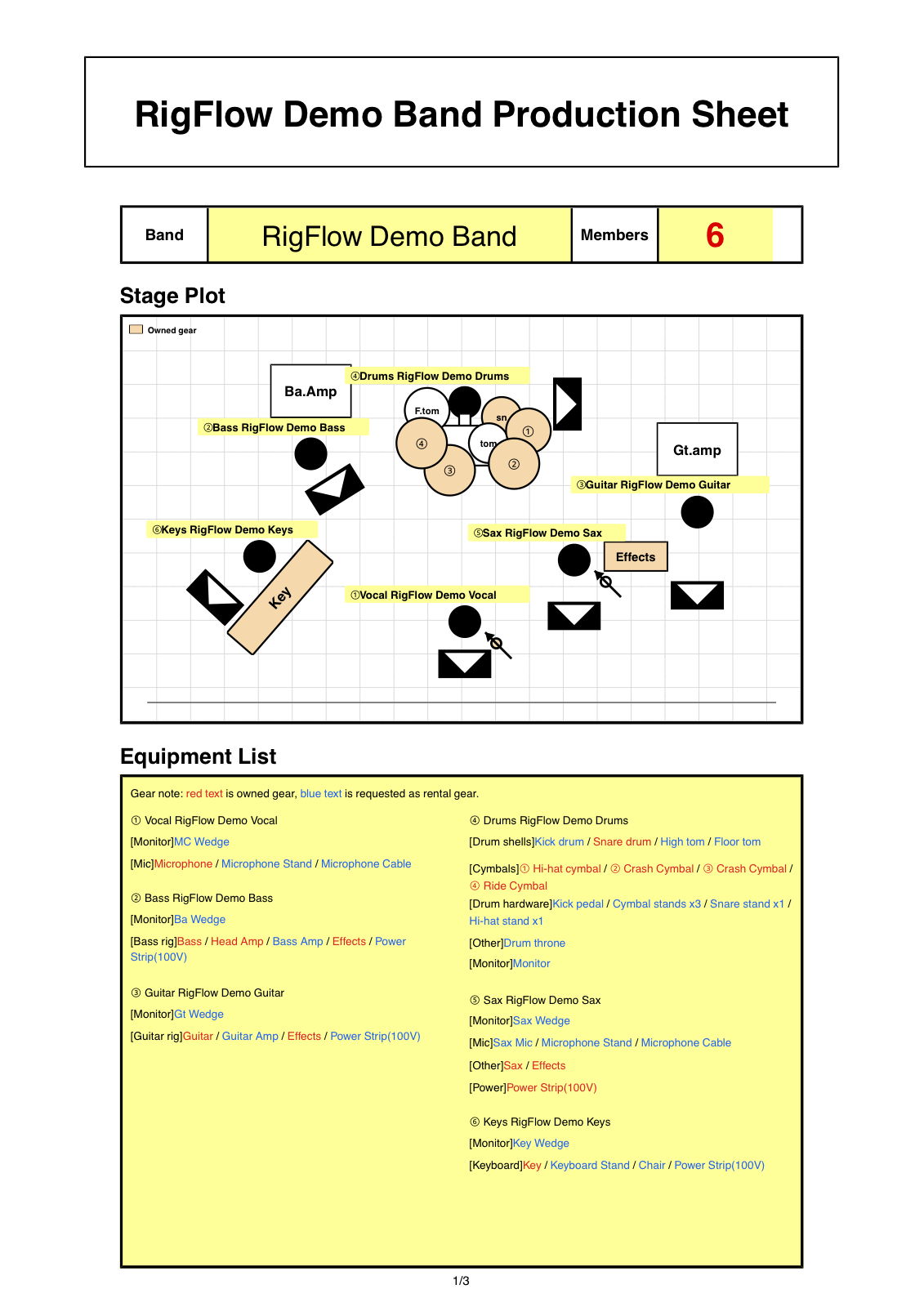
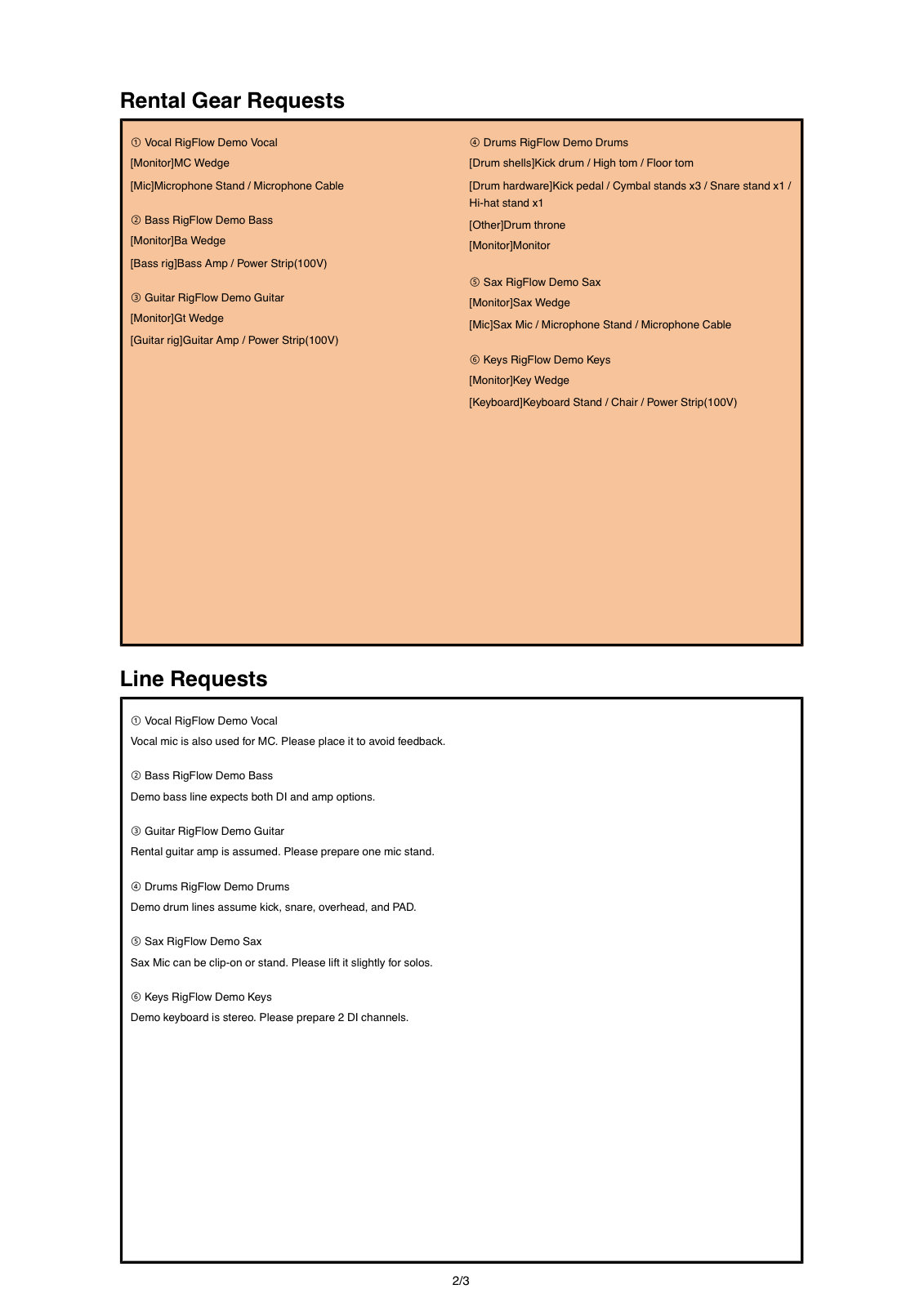
For small shows, the input list can live inside the same PDF as the stage plot and equipment list as long as microphones, DI boxes, playback, monitor and power notes are clear.
Use this input list template approach to check microphones, DI boxes, stereo sources, playback, monitor and power notes, and performer context before exporting a RigFlow PDF.
PDF example
Connect every input to a person or source
Inputs are easier to prepare when they are attached to performers and stage positions, so the sound engineer can see both the channel need and where it happens.
The input list answers what needs a channel
A stage plot shows where people and gear are. An input list explains what the sound desk needs to receive: vocals, guitar microphones, bass DI, stereo keys, tracks, talkback, or other sources.
For many independent bands, the input list does not need to become a separate spreadsheet. It needs to be accurate, readable, and connected to the stage setup.
An input list template is useful when the sound engineer can turn it into a patch plan without guessing.
What to include in an input list
- Vocal and backing vocal microphones
- Instrument microphones and DI boxes
- Stereo keyboard, sampler, or playback outputs
- Drum kit source notes when relevant
- Monitor and in-ear requirements
- Power and personal gear notes
How to prepare the input list
- 01
List every source
Start with vocals, instruments, tracks, samplers, keyboards, and any source that needs the sound system.
- 02
Attach each source to a performer
Connect the input need to the person or instrument on the stage plot so setup questions are easier to answer.
- 03
Mark microphone or DI
Write whether the source needs a microphone, DI, stereo DI, or personal gear connection.
- 04
Add monitor and power notes
Include monitor requests, in-ear systems, and power needs near the relevant performer.
- 05
Preview the PDF
Check that the input notes are readable beside the stage plot and equipment list before sending.
Make the list useful for soundcheck
Write stereo when a source needs two channels. Write DI when a source should be direct. If a performer brings a personal microphone or in-ear system, mark it before sending.
Keep notes short. The input list is a preparation document. Save longer context for the tech rider or venue notes.
Common mistakes before sending
- Writing instrument names without channel needs
- Forgetting stereo playback or keyboard outputs
- Leaving backing vocals out of the list
- Not marking personal microphones or in-ear systems
- Sending input notes separately from the stage plot
Checklist before exporting the PDF
- Every vocal and instrument source is listed
- DI, microphone, stereo, and playback needs are clear
- Monitor and power notes are tied to performers
- Personal gear is marked before export
- The final PDF can be understood without extra messages
Frequently asked questions
Is an input list different from a stage plot?
Yes. The stage plot shows positions. The input list shows what sources need channels. They work best when they are connected.
Do small bands need an input list?
Many do. Even a short list of vocals, DI boxes, tracks, and monitors helps the venue prepare faster.
Can RigFlow export the input details?
RigFlow exports equipment and request details with the stage plot PDF, so the input information can travel with the same show document.